
Project #11
INVERSE KINEMATICS ENGINE
IK Solver is a forward kinematics visualization engine and an inverse kinematics solver. Forward Kinematics (FK) involves knowing the end position of an actuator like a robot arm, given the angles that the joints move to. By moving the slider you can adjust α₁ and α₂ for the arm and see visually where the end effector would end up. Inverse Kinematics (IK) on the other hand involves the mathematics needed to evaluate the joint angles to get the end effector to a desired position. It works the opposite way from FK and you could call it backwards or reverse kinematics. By switching to the Inverse Kinematics Mode you can enter the x and y coordinates for the location you want the end effector to be in and it will solve for the required angles (α₁ and α₂), needed. It would display this is the graph in the same window.
Technical Breakdown
my derivation notes
requirements to run locally:
1. numpy
2. math
3. matplotlib
4. streamlit (if you'd like to host yours)
Link to the GitHub Repo: Ik Solver
* The repo is the source code for the online engine which you can access here
* You can also get the local version that opens a graphical window on your laptop locally. It runs with matplotlib and all the remote features are still accessible this way. Sliders affect the arm in real-time and you type the end effector coordinates in the terminal to have it solve for IK.
* You may likely have to "wake the website up" once you click on the site link since it can't be kept running forever to conserve energy and resources.
* I am working on a formal LaTeX document to properly document the derivation steps.
Demonstration Video
In this screen-recording I walk through all the Ik & FK Engine has to offer. In the Forward Kinematics (Sliders) mode, I manipulate the respective sliders for α₁ and α₂ by the left hand menu. α₁ is defined as +ve CCW from the origin and α₂ is +ve CW from the global x-axis with respect to the second joint.
I head over to IK and input various coordinates in the x and y boxes for where I would like the end effector to end up; ( 9, 3) and ( -4, 8). The engine displays the angles needed for α₁ and α₂ and shows the graphical interface with the angles already applied.
It is also worth noting that the IK solver prefers the elbow-up configuration.
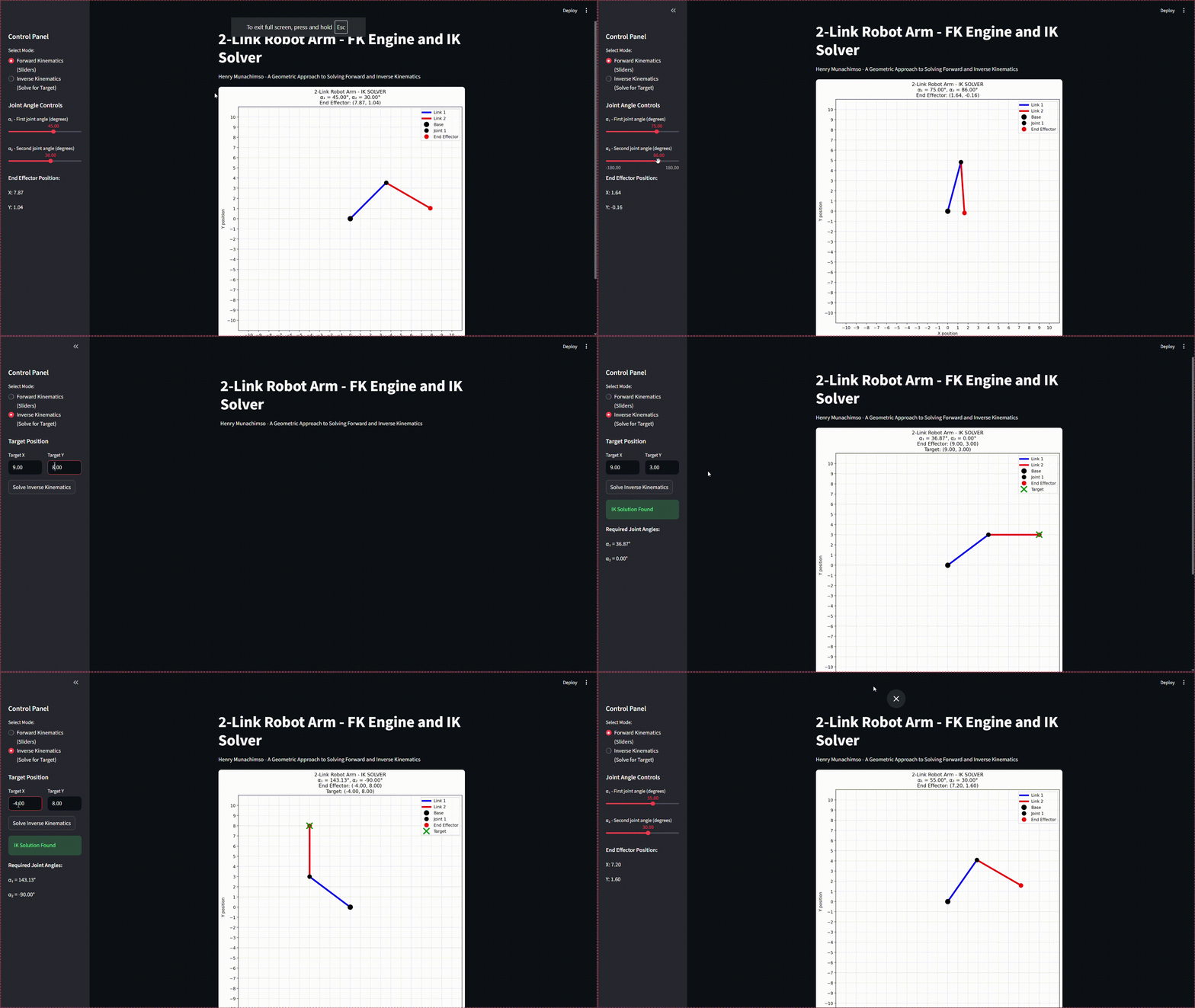
Walkthrough Video on Using the Webpage
Notes
I had spent about the last two months being fascinated with mobile robotics. I explored a lot of open-source designes and came across some of the big names in the industry; Spot and Dingo included.
I plan to get my hands on one of these in the near future and in the meantime I tried my hands with setting up a 6DOF robot arm. (I'll link a deeper dive into this soon). As my friend and I were nearing completing the project we wondered the kind of mathematics and control system code would be needed to get the arm to move to certain locations, do dances and make preprogrammed gestures, that question is how we ended up in the world of inverse kinematics.
Looking at tutorials online we came across a lot of ways IK sould be solved (even for hexapods) but these solutions usually required a little complex matrix mathematics and manpulations and sometimes using the Jacobian. I was troubled by this and wanted to see if there was a way that if I was given just a coordinate in 2D space (x,y), I could generate functions that would output both α₁ and α₂.
It took about an hour or so of drawing and labelling and relabelling triangles and redefining coordinates that ended up with the fancy two-page derivation here. To verify this I put my two formulas into the desmos calculator and drew a graph on a blank sheet on my dorm and used a protractor to verify my angles (my autocad wasn't working :(
The next step was generating a program to tidy up the process of visualizing my two angles. I have experience with python and matplotlib so setting up the script was a fun little process that took a full day but i was glad when it turned out fine.
Going up a step from that would have me make a webpage accessible by everyone that wanted to solve the Inverse Kinematics for a planar two-link robot arm. A search led me to StreamLit and integrating that with my previous script was a whole journey that ended up working after a lot of debugging.
There a couple of things to note from this.
* I defined α₁ as +ve CCW from the origin and α₂ is +ve CW from the global x-axis with respect to the second joint. My belief was that this would be easier to solve for and represented what is available when working with actual robots; the angle written for the second joint doesn't depend on α₁. I have come to find that this is not common practice as α₂ is more often than not relative. Oh well. Do with that as you wish😛
* By nature of my definitions and how I solved for my equations, the IK solver would always give solutions that prefer the 'elbow-up configuration' ie keeping α₁ positive where possible. This is purely a personal choice.
* I am working on a paper to document the elegant steps taken to arrive at this derivation that would be published once finished.
* When clicking on the link for the remote website, you will very lkely have to click the button at the center to 'wake the app up'. This is because to conserve resources, streamlit 'puts some apps to sleep' and starts them up again and reinstalls dependencies once is is requested for again. Don't let this deter you, it doesn't take up to a minute to set up.
* You can also get the local versio for your own pc on my github.
Thanks for viewing. Let me know what you think and I'm definitely open to improvements. (adding more links, using matrices and solving with the jacobian, controlling multiple arms at once et cetera.
